
Most organizations have no shortage of information.
Policies, contracts, reports, proposals, training materials, compliance documentation, standard operating procedures, and project files accumulate over time. While this information is valuable, employees often struggle to find the answers they need when they need them.
In many cases, knowledge exists somewhere in the organization, but locating it requires significant time and effort.
This is where Adobe Knowledge Base can help.
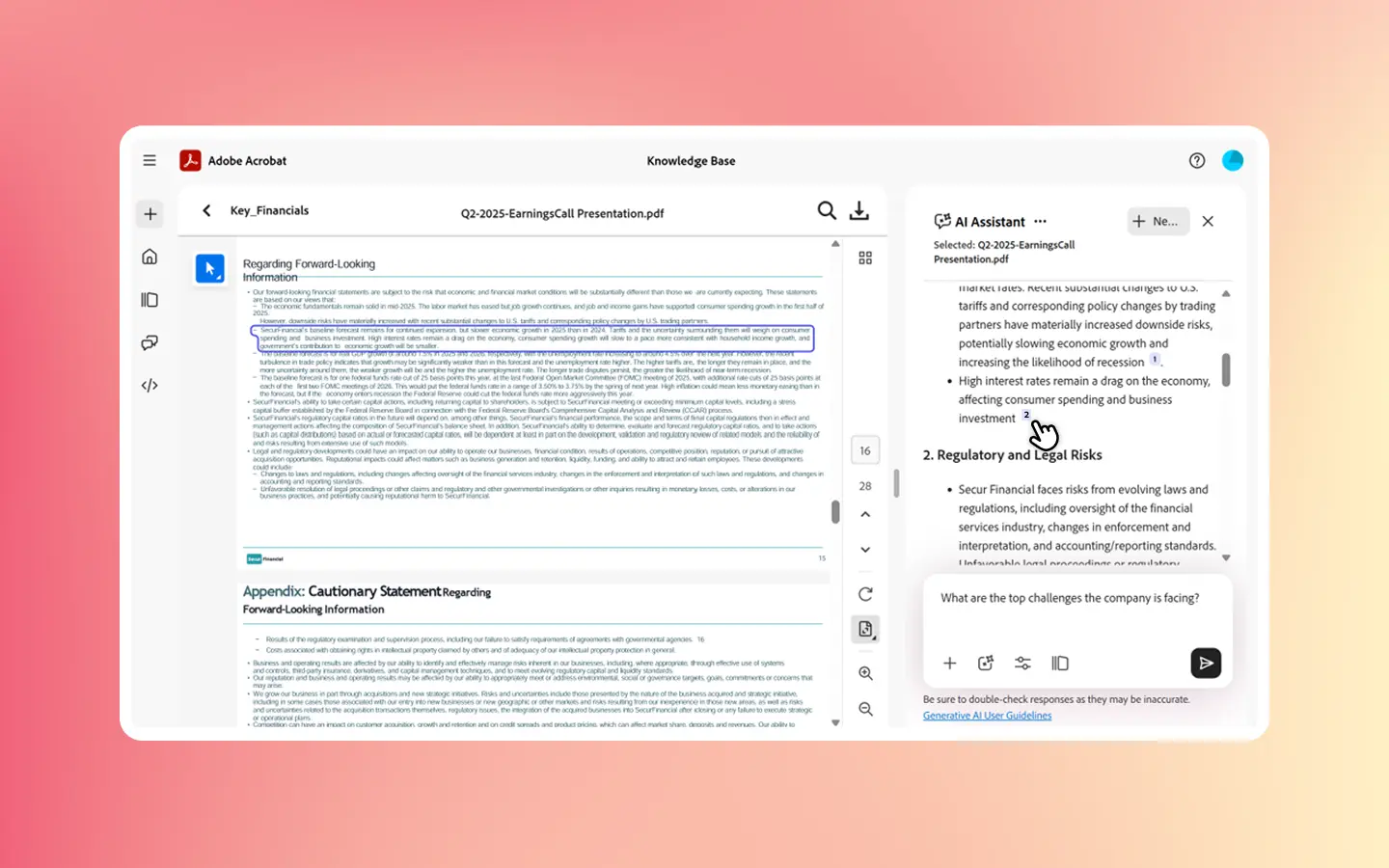
As part of Adobe Acrobat Studio, Adobe Knowledge Base is designed to transform vast collections of documents into a searchable source of trusted information. Adobe states that Knowledge Base enables teams to find cited answers from document collections in seconds, helping employees access information more efficiently.
What Is Adobe Knowledge Base?
Adobe Knowledge Base is a capability within Adobe Acrobat Studio that helps organizations organize document collections and surface answers from those documents more effectively.
Rather than manually reviewing hundreds or thousands of files, users can interact with information through a more intelligent experience.
According to Adobe, Knowledge Base allows organizations to create a centralized source of guidance by enabling users to search and retrieve cited answers from document libraries.
This helps transform traditional document repositories into a more useful business resource.
Why Traditional Document Libraries Create Challenges
Many organizations store information across multiple systems, folders, file shares, and repositories.
Common challenges include:
- Employees spending time searching for information
- Duplicate work caused by inaccessible knowledge
- Inconsistent answers across departments
- Delayed decision-making
- Reduced productivity
Even when information exists, finding it quickly can be difficult.
This is why organizations increasingly invest in solutions that support better knowledge management and information discovery.
Adobe Knowledge Base addresses this challenge by helping users locate information faster and with greater confidence.
How Adobe Knowledge Base Improves Knowledge Discovery
One of the primary benefits of Adobe Knowledge Base is making information more accessible across the organization.
Faster Search Across Document Collections
Employees often need answers from multiple sources.
Adobe explains that Knowledge Base helps users retrieve information from large document collections without manually opening and reviewing numerous files.
This can significantly reduce the time required to locate business-critical information.
Trusted and Cited Answers
When employees receive information, they often need to verify where it came from.
Adobe highlights that answers generated through Acrobat Studio can include citations linked to source context, helping users validate information more easily.
This improves confidence in the answers provided while maintaining transparency.
Reduced Information Silos
Many organizations struggle with knowledge being trapped inside individual departments.
Adobe Knowledge Base helps make information more accessible by creating a shared source of organizational knowledge.
Adobe Knowledge Base and AI-Powered Document Intelligence
A major advantage of Adobe Knowledge Base is its connection to Adobe’s AI-powered document intelligence capabilities.
Adobe Acrobat AI Assistant is designed to help users interact with documents, generate summaries, ask questions, and discover insights from content collections. Adobe states that AI Assistant provides summaries, answers, and cited insights linked directly to source documents.
Together, these capabilities allow organizations to:
- Find answers faster
- Reduce manual document review
- Improve knowledge sharing
- Accelerate decision-making
- Increase productivity
Rather than treating documents as static files, organizations can derive greater value from existing information assets.
Common Business Use Cases for Adobe Knowledge Base
Organizations can apply Adobe Knowledge Base across many business functions.
Human Resources
HR teams often manage large collections of policies, procedures, onboarding materials, and employee documentation.
Knowledge Base can help employees find information more efficiently.
Legal and Compliance
Legal departments frequently manage contracts, policies, and regulatory documentation.
Quick access to trusted information can improve responsiveness and reduce manual research.
Operations Teams
Operational documents often contain valuable process knowledge.
With better search capabilities, employees can access guidance more consistently.
Learning and Development
Training departments can use document intelligence capabilities to help employees locate learning resources and organizational knowledge faster.
Adobe Knowledge Base and Business Productivity
Knowledge management is directly connected to organizational productivity.
Employees spend valuable time searching for information, reviewing documents, and verifying answers.
By implementing Adobe Knowledge Base, organizations can help reduce these inefficiencies.
When combined with Adobe Acrobat Studio, organizations can create a more intelligent document ecosystem that supports faster information discovery, collaboration, and decision-making. Adobe positions Acrobat Studio as a platform that combines AI-powered insights, document intelligence, collaboration, and content creation capabilities.
This can help teams focus more on action and less on searching.
Adobe Knowledge Base at a Glance
| Challenge | Adobe Knowledge Base Benefit |
|---|---|
| Information Silos | Centralized Knowledge Access |
| Long Document Searches | Faster Information Retrieval |
| Inconsistent Answers | Cited Source-Based Responses |
| Duplicate Work | Better Knowledge Sharing |
| Slow Decision-Making | Faster Access to Insights |
| Growing Document Libraries | Scalable Knowledge Management |
Adobe positions Knowledge Base as part of Acrobat Studio’s broader document intelligence capabilities, helping organizations gain more value from existing document collections.
Helpful Adobe Resources
Adobe Acrobat Studio – Learn how Acrobat Studio combines document intelligence, AI workflows, content creation, and collaboration into a single platform.
Adobe Knowledge Base and Document Intelligence Features – Discover how Adobe helps organizations transform document collections into searchable business intelligence.
Turn Information into Business Intelligence with Adobe Knowledge Base
Many organizations already possess valuable information. The challenge is making that knowledge accessible when employees need it.
Adobe Knowledge Base helps transform document libraries into a searchable source of organizational intelligence, making it easier to locate answers, verify information, and share knowledge across teams.
By combining AI-powered insights, document intelligence, and trusted source citations, organizations can improve productivity while unlocking greater value from existing information assets.
At Bintara Solutions, we help organizations evaluate Adobe Acrobat Studio, improve knowledge management practices, and implement document intelligence solutions that support productivity, collaboration, and business growth.