
Organizations today support employees, customers, systems, and devices across multiple locations. Whether teams are working in the office, remotely, or across branch locations, IT departments often need reliable ways to provide support without being physically present.
This is where TeamViewer becomes relevant.
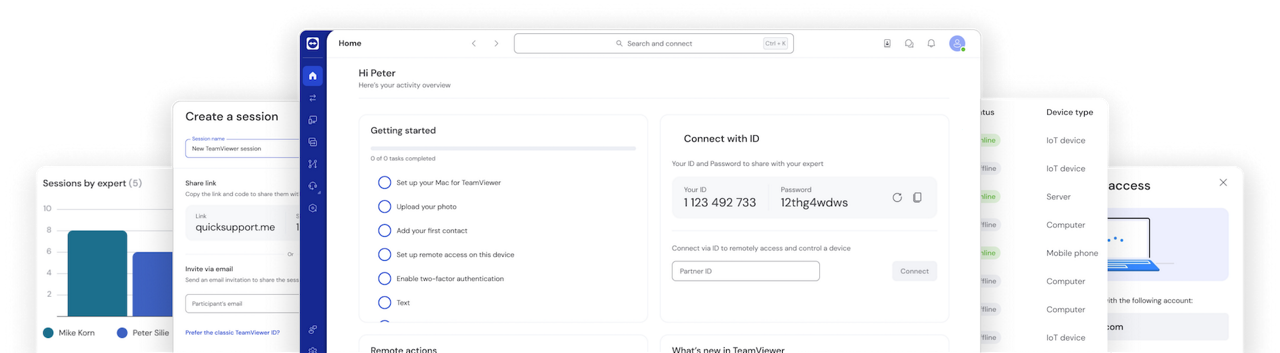
TeamViewer is a remote access and remote support solution that allows authorized users to connect to devices, provide assistance, manage systems, and troubleshoot issues from almost anywhere with an internet connection.
Learn more about TeamViewer Remote Access.
What Is TeamViewer?
TeamViewer is a remote connectivity platform that allows users to securely access and control devices remotely.

Organizations commonly use TeamViewer for:
- Remote IT support
- Device troubleshooting
- Hybrid work support
- Unattended access
- System maintenance
- Technical assistance
Instead of travelling to a user’s location, IT teams can access devices remotely and assist users through a secure connection.
Learn more at the TeamViewer Official Website.
How Does TeamViewer Work?
TeamViewer creates a secure connection between devices.
Once authorized, support personnel can connect to another device remotely and perform actions such as:
- Viewing the user’s screen
- Troubleshooting problems
- Adjusting settings
- Installing updates
- Providing technical assistance
- Transferring files
This allows support teams to help users regardless of physical location.
What Is Remote Access
Remote access allows a user to connect to a device from another location.
For example, an employee working from home may need access to their office workstation.
With remote access, the employee can connect to the office device and continue working without being physically present.
Common remote access use cases include:
- Hybrid work
- Remote work
- Business travel
- Accessing office applications
- Accessing files and systems
What Is Remote Support?
Remote support allows IT teams and service desks to assist users remotely.
Instead of travelling to a branch office or employee location, support staff can connect directly to the affected device.
Common support activities include:
- Password assistance
- Software troubleshooting
- System updates
- Configuration changes
- Error investigation
- User guidance
This can significantly reduce response times compared to traditional on-site support.
What Is Unattended Access?
Unattended access allows authorized users to access devices even when nobody is sitting at the computer.
Organizations often use unattended access for:
- Server management
- Device maintenance
- Software updates
- System monitoring
- After-hours support
This capability can help IT teams manage infrastructure more efficiently.
Which Devices Can TeamViewer Connect To?
Organizations often use TeamViewer across multiple device types.
Examples include:
| Device Type | Common Use Cases |
|---|---|
| Desktop Computers | IT support and remote access |
| Laptops | Employee support and troubleshooting |
| Servers | Maintenance and administration |
| Mobile Devices | Remote assistance and management |
| Workstations | Productivity and support |
The ability to support different device types can be particularly useful for organizations managing distributed environments.
Why Do Businesses Use TeamViewer?
Organizations often choose TeamViewer to help improve operational efficiency.
Common reasons include:
Faster IT Support
Support teams can assist users immediately without travelling.
Reduced Downtime
Issues can often be addressed more quickly when remote access is available.
Support for Hybrid Work
Employees working from different locations can receive support regardless of where they are located.
Improved Productivity
Less time spent waiting for support can help employees remain productive.
Multi-Location Support
Organizations with branch offices can support users from a centralized IT team.
Which Departments Can Use TeamViewer?
Although TeamViewer is frequently associated with IT support, multiple departments can benefit from remote access capabilities.
Examples include:
- Information Technology
- Service Desk Teams
- System Administration
- Operations
- Engineering
- Technical Services
- Educational Institutions
- Managed Service Providers (MSPs)
Remote connectivity can support both operational and technical workflows.
Is TeamViewer Useful for Hybrid Work?
Yes.
Hybrid work has increased the need for employees and IT teams to remain connected regardless of location.
Employees may work from:
- Offices
- Home offices
- Customer locations
- Branch offices
- Shared workspaces
TeamViewer can help support device access and troubleshooting across these environments.
As organizations continue adopting hybrid work models, remote connectivity solutions play an increasingly important role in maintaining productivity and support services.
What Should Organizations Consider Before Using TeamViewer?
Organizations often evaluate several factors when selecting a remote access solution.
Number of Users
How many administrators or support staff require access?
Supported Devices
Which endpoints need to be managed or supported?
Security Requirements
What access controls are required?
Remote Work Needs
Will users need access to office systems from home?
IT Support Processes
How will remote support fit within existing workflows?
Answering these questions can help organizations determine the most suitable deployment approach.
Helpful TeamViewer Resources
- TeamViewer Official Website – Explore TeamViewer products, features, and business solutions.
- TeamViewer Remote Access – Learn about remote access capabilities and use cases.
- TeamViewer Business Solutions – Discover solutions for IT support, remote work, and enterprise environments.
Explore TeamViewer for Your Organization
Remote access and remote support have become important capabilities for organizations managing distributed teams, hybrid work environments, and multiple locations.
TeamViewer helps organizations improve support responsiveness, reduce operational downtime, and provide secure remote connectivity for employees and IT teams.
At Bintara Solutions, we help organizations evaluate TeamViewer licensing, remote support requirements, hybrid work strategies, and secure remote access solutions that align with business needs.