As organizations grow, managing remote access becomes increasingly complex.
Employees work across multiple locations, support teams manage thousands of devices, and IT departments must balance productivity with security. While traditional remote access tools may work well for smaller environments, larger organizations often require more advanced controls, centralized management, and enterprise-grade security.
This is where TeamViewer Tensor comes in.
TeamViewer Tensor is TeamViewer’s enterprise remote connectivity platform designed for large organizations that require secure remote access, centralized governance, and scalable support capabilities. TeamViewer highlights Tensor as a solution built for enterprise environments managing distributed devices, users, and IT operations.
What Is TeamViewer Tensor?
TeamViewer Tensor is an enterprise-grade remote access and remote support platform built to support complex organizational requirements.
Unlike standard remote access deployments, TeamViewer Tensor focuses on:
- Enterprise-scale remote access
- Centralized device management
- Advanced security controls
- User management
- Access governance
- Scalable support operations
Organizations often evaluate TeamViewer Tensor when supporting large numbers of users, devices, branch offices, and distributed teams.
For enterprises, consistency and control become just as important as connectivity.
Why Enterprises Need More Than Traditional Remote Access
Many organizations begin with basic remote access tools.
However, as environments become larger and more distributed, several challenges often emerge:
Growing Device Counts
IT teams may need to manage hundreds or thousands of devices across different sites.
Distributed Workforces
Employees often work from:
- Headquarters
- Regional offices
- Customer sites
- Home offices
- Hybrid environments
Security Requirements
Enterprise organizations typically require tighter access controls and stronger governance.
Compliance and Visibility
IT leaders increasingly need greater visibility into who accesses devices and when.
These challenges are a major reason organizations move toward solutions such as TeamViewer Tensor.
How TeamViewer Tensor Supports Enterprise Remote Access
One of the primary strengths of TeamViewer Tensor is its ability to support large-scale remote connectivity while maintaining centralized control.
Remote Support at Scale
Enterprise support teams often need to assist users across multiple locations.
With TeamViewer Remote, support personnel can access devices remotely, troubleshoot issues, and help employees without requiring physical travel.
This can help reduce response times and improve user experiences.
Centralized Access Management
Managing access becomes increasingly important as organizations grow.
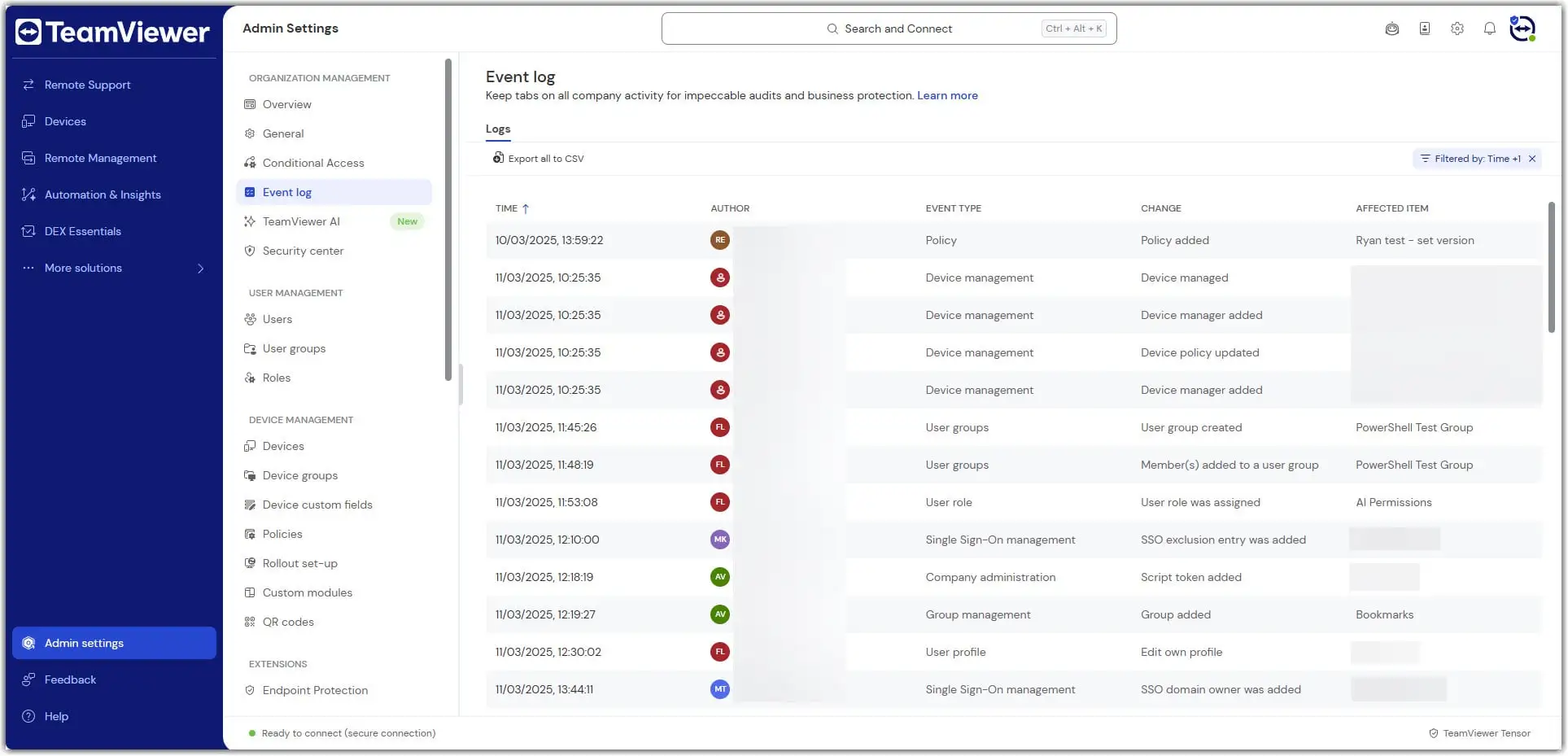
TeamViewer Tensor supports centralized administration designed to help organizations manage users, permissions, and remote access policies more effectively.
This allows IT teams to maintain greater visibility and control across enterprise environments.
Cross-Platform Connectivity
Modern organizations often operate across multiple device types and operating systems.
TeamViewer highlights broad platform compatibility as one of its key capabilities, helping organizations support diverse environments through a single solution.
TeamViewer Tensor and Enterprise Security
Security remains one of the most important considerations when evaluating remote access solutions.
TeamViewer Tensor is designed to help organizations maintain secure remote connectivity while supporting productivity.
According to TeamViewer, enterprise security capabilities include:
- Encryption
- Granular access controls
- Centralized administration
- Authentication controls
- Secure remote connections
Organizations evaluating TeamViewer security capabilities often focus on protecting sensitive systems while maintaining operational flexibility.
As remote work and distributed operations continue to expand, security and accessibility must work together.
Supporting Global and Distributed Organizations
Many enterprises operate across:
- Multiple countries
- Regional offices
- Manufacturing sites
- Branch networks
- Remote work environments
Providing consistent support across such environments can be difficult without centralized management tools.
TeamViewer Tensor helps organizations support distributed users and devices while maintaining standardized access policies and governance structures.
For organizations with complex operational environments, centralized visibility can significantly improve support efficiency.
TeamViewer Tensor at a Glance
| Enterprise Requirement | TeamViewer Tensor Capability |
|---|---|
| Remote Support | Remote Access and Troubleshooting |
| Distributed Workforce | Enterprise Connectivity |
| Access Control | Centralized User Management |
| Security | Encryption and Governance Controls |
| Multi-Site Operations | Centralized Administration |
| Scalability | Enterprise-Grade Architecture |
These capabilities help explain why organizations evaluate TeamViewer Tensor as part of their enterprise remote access strategy.
Helpful TeamViewer Resources
TeamViewer Enterprise Solutions – Explore TeamViewer’s remote access, remote support, device management, and enterprise connectivity solutions.
TeamViewer Remote – Learn how TeamViewer enables secure remote access, remote support, and device management across distributed environments.
TeamViewer for Small Businesses – Discover how TeamViewer helps growing organizations support remote work, manage devices, and improve IT efficiency.
Strengthen Enterprise Remote Access with TeamViewer Tensor
As organizations continue to expand and support more distributed work environments, secure and scalable remote access becomes increasingly important.
TeamViewer Tensor helps enterprises deliver secure remote access, centralized governance, improved visibility, and enterprise-grade support capabilities without sacrificing productivity.
At Bintara Solutions, we help organizations evaluate TeamViewer Tensor, assess enterprise remote access requirements, and implement remote support strategies that align with business, security, and operational goals.
