Adobe Studio for Business: Transforming Documents into Actionable Content

Adobe Acrobat Studio

Organizations generate thousands of documents every year. Reports, proposals, meeting notes, policies, business plans, research papers, financial documents, presentations, and operational records all contain valuable information.

However, one challenge remains consistent across many organizations:

How can teams transform information locked inside documents into useful content that drives decisions and action?

This is where Adobe Studio for Business can help.

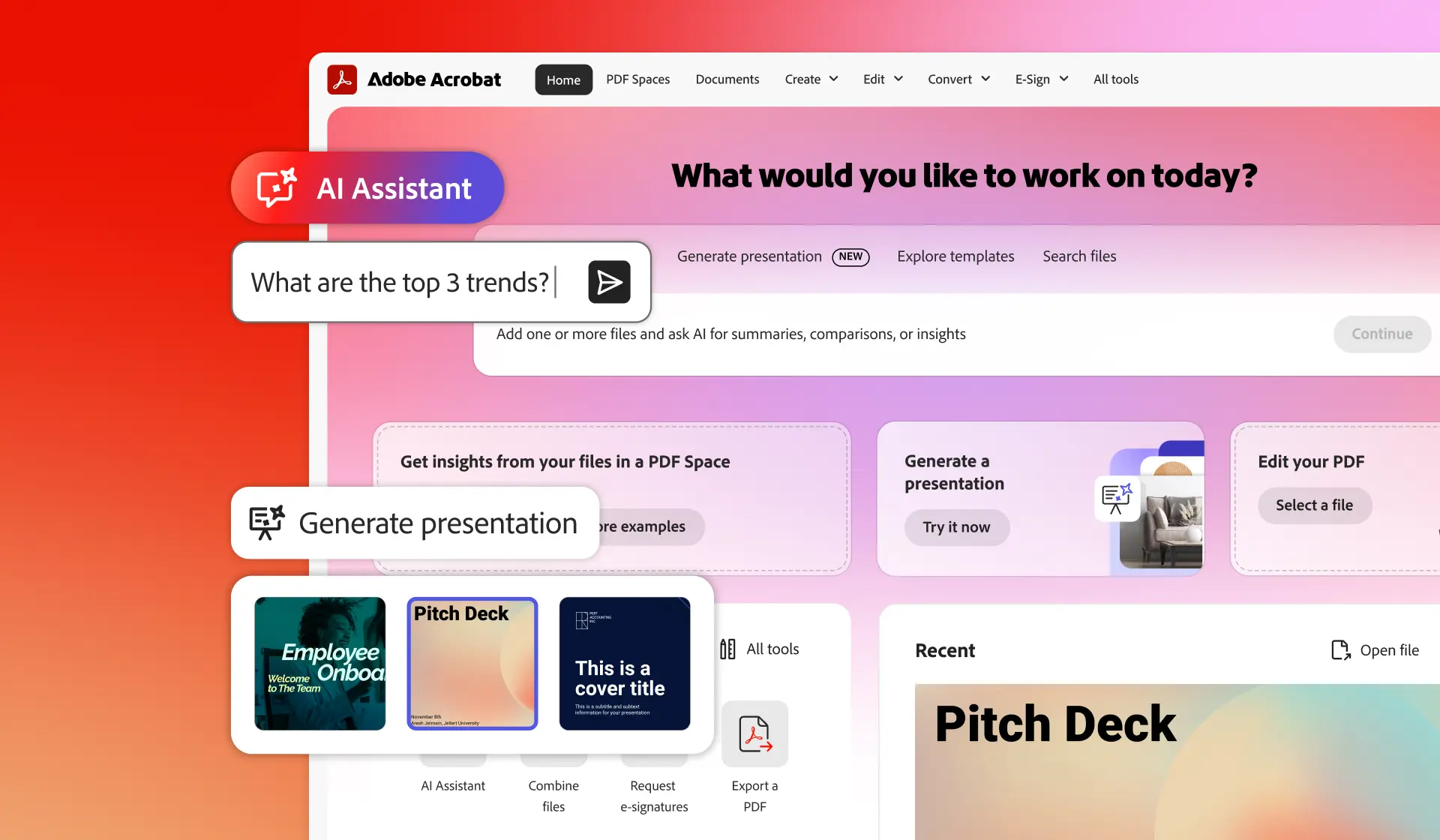
Adobe Acrobat Studio combines PDF workflows, AI-powered document intelligence, content creation capabilities, collaboration features, and Adobe Express tools in a single platform designed to help organizations work more efficiently. Adobe positions Acrobat Studio as an AI-powered productivity platform that combines PDF tools, document workflows, AI Assistant capabilities, content creation, and collaboration into a unified environment.
Learn more about Adobe Acrobat Studio.

What Is Adobe Studio for Business?

Adobe Studio for Business refers to the use of Adobe Acrobat Studio to help organizations manage documents, extract insights, create content, and improve productivity.

Unlike traditional document tools that focus solely on viewing or editing files, Adobe Studio is designed to help teams transform information into actionable business content.

Adobe describes Acrobat Studio as combining:

  • PDF tools
  • AI Assistant
  • PDF Spaces
  • Content creation capabilities
  • Adobe Express Premium
  • E-signature workflows

within a single platform.

Why Are Organizations Rethinking Document Workflows?

Many teams spend significant amounts of time:

  • Searching for information
  • Reviewing lengthy reports
  • Creating presentations
  • Summarizing documents
  • Reusing content
  • Managing approvals

As document volumes continue growing, traditional workflows can become increasingly inefficient.

Common challenges include:

Information Overload

Important information is often buried within lengthy documents.

Repetitive Content Creation

Teams frequently recreate presentations and summaries from existing reports.

Collaboration Challenges

Multiple stakeholders may need access to the same documents.

Brand Consistency

Content created by different teams may not always follow consistent branding standards.

Organizations are increasingly looking for ways to simplify these processes while maintaining governance and control.

How Does Adobe Studio for Business Work?

Adobe Studio for Business combines document workflows and content creation into a single environment.

Instead of moving between multiple tools, teams can work within one platform to:

  • Review documents
  • Extract information
  • Generate summaries
  • Create presentations
  • Build branded content
  • Share information securely

Adobe states that Acrobat Studio combines document productivity with content creation and AI-powered workflows to help teams work faster and more effectively.

What Is AI Assistant in Adobe Studio?

AI Assistant is one of the key capabilities highlighted within Acrobat Studio.

Adobe describes AI Assistant as helping users understand documents, locate information, generate insights, and support productivity workflows through conversational interactions.

Organizations may use AI Assistant to:

  • Review lengthy reports
  • Summarize information
  • Extract key insights
  • Identify important data
  • Improve document understanding

This can help reduce the time spent manually reviewing complex documents.

What Are PDF Spaces?

Adobe Studio introduces PDF Spaces, designed to help teams organize documents, collaborate more effectively, and access information from multiple files in a structured environment.

Adobe describes PDF Spaces as AI-powered collaboration environments that help teams organize content, extract insights, and work across multiple documents.

Organizations may use PDF Spaces for:

  • Project documentation
  • Research materials
  • Business reports
  • Team collaboration
  • Executive reviews

By placing related information within a shared space, teams can improve visibility and collaboration.

How Does Adobe Studio Help Create Business Content?

One of the most compelling capabilities of Adobe Studio is its ability to transform documents into content.

Adobe promotes functionality that enables users to create:

  • Presentations
  • Flyers
  • Infographics
  • Internal communications
  • Social content
  • Business reports

using information already contained within documents.

This can significantly reduce the effort required to create new content from existing information.

Turning Documents Into Presentations

Creating executive presentations often requires significant manual effort.

Teams frequently spend time:

  • Reviewing reports
  • Extracting information
  • Designing slides
  • Creating visual summaries

Adobe Studio promotes AI-powered presentation generation capabilities that allow users to create structured presentations from documents and prompts.

Potential use cases include:

  • Executive briefings
  • Board presentations
  • Project updates
  • Client proposals
  • Internal communications

How Does Adobe Studio Help Maintain Brand Consistency?

Organizations often struggle to maintain consistency when multiple teams produce content.

Adobe Studio includes content creation capabilities that support customized templates, branding elements, and Adobe Express integration.

Organizations can use branded assets such as:

  • Logos
  • Templates
  • Colors
  • Visual guidelines

to help maintain consistent communications across departments.

Which Teams Can Benefit from Adobe Studio for Business?

Adobe Studio for Business is not limited to marketing or design teams.

It can support:

Corporate Communications

Creating announcements, presentations, and executive communications.

Human Resources

Managing employee communications and policy documentation.

Finance

Summarizing reports and creating executive updates.

Operations

Managing documentation and business processes.

Legal

Reviewing and organizing important documents.

Sales and Business Development

Developing proposals and client-facing materials.

Adobe positions Acrobat Studio as a productivity platform suited for multiple business functions including HR, Finance, Legal, Marketing, and Operations.

Why Are Organizations Considering Adobe Studio Instead of Multiple Separate Tools?

Many organizations currently use separate solutions for:

  • PDF management
  • Content creation
  • Collaboration
  • Presentations
  • E-signatures
  • AI productivity

Adobe Studio brings many of these capabilities together within a single platform. Adobe describes Acrobat Studio as combining PDF tools, AI Assistant, Adobe Express capabilities, content creation, and collaboration within one environment.

This can help simplify workflows while reducing the need to move between different applications.

Helpful Adobe Studio Resources

Transform Documents Into Actionable Content

Documents contain valuable information, but information alone does not drive business outcomes.

Adobe Studio for Business helps organizations transform reports, proposals, presentations, and other business documents into content, insights, and communications that support better decision-making and productivity.

At Bintara Solutions, we help organizations evaluate Adobe Studio licensing, explore document productivity workflows, and identify solutions that support collaboration, AI-powered content creation, and business efficiency.