As organizations modernize their email infrastructure, many choose a hybrid approach rather than moving everything to the cloud at once.
A hybrid deployment allows organizations to integrate their on-premises Exchange environment with Microsoft 365 Exchange Online while maintaining administrative flexibility during migration.
However, configuring a hybrid environment manually can be complex.
This is where the Microsoft 365 Hybrid Configuration Wizard helps.
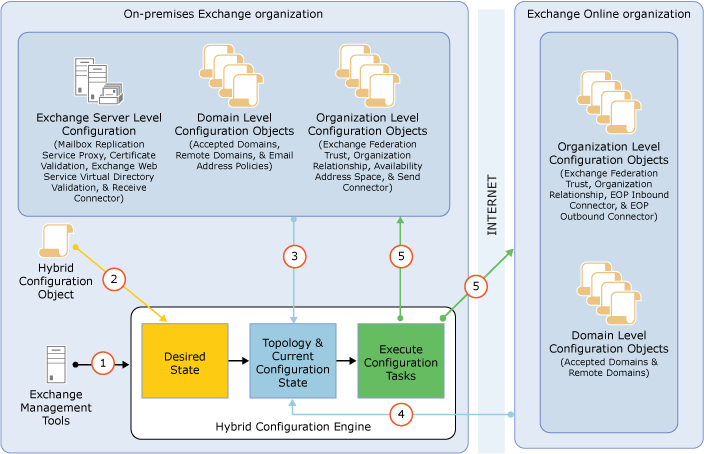
Microsoft’s Hybrid Configuration Wizard is designed to simplify the process of establishing and managing Exchange hybrid deployments by automating configuration tasks across both on-premises Exchange environments and Exchange Online. Microsoft states that the Hybrid Configuration Wizard gathers configuration information, validates environments, defines deployment parameters, and performs configuration tasks in both environments.
What Is the Microsoft 365 Hybrid Configuration Wizard?
The Hybrid Configuration Wizard (HCW) is Microsoft’s primary deployment tool for configuring Exchange hybrid environments.

According to Microsoft, the Hybrid Configuration Wizard:
- Creates hybrid configuration objects
- Gathers Exchange and Active Directory configuration data
- Collects Exchange Online configuration information
- Validates deployment requirements
- Configures hybrid connectivity
Microsoft describes HCW as the recommended deployment process for Exchange hybrid environments.
Organizations typically use HCW when connecting:
- Exchange Server
- Exchange Online
- Microsoft 365
within a unified hybrid environment.
Why Do Organizations Use Exchange Hybrid Deployments?
Many organizations cannot immediately move all mailboxes and services to the cloud.
Common reasons include:
- Phased migration projects
- Compliance requirements
- Legacy infrastructure
- Operational considerations
- Business continuity planning
A hybrid deployment helps organizations maintain coexistence between on-premises and cloud environments during migration.
Microsoft notes that hybrid deployments extend the administration and user experience of on-premises Exchange environments into Exchange Online.
How Does the Hybrid Configuration Wizard Help?
Before a hybrid deployment can operate successfully, multiple configurations must be established.
Microsoft explains that HCW validates prerequisites, verifies topology requirements, collects environment information, and performs configuration activities across both environments.
Examples of what HCW helps validate include:
- Exchange Server versions
- Exchange Online connectivity
- Active Directory synchronization
- Accepted domains
- Certificates
- Exchange Web Services configuration
- Administrative permissions
Automating these processes helps reduce complexity and deployment effort.
Key Benefits of the Microsoft 365 Hybrid Configuration Wizard
Organizations often use HCW because it helps simplify hybrid deployments.
Simplified Configuration
Rather than manually configuring numerous Exchange settings, organizations can use a guided deployment process.
Reduced Deployment Complexity
The wizard helps validate prerequisites before deployment begins.
Consistent Setup
Microsoft designed HCW to standardize Exchange hybrid configuration processes.
Support for Migration Projects
HCW supports organizations planning mailbox migrations between on-premises Exchange and Exchange Online.
Common Use Cases for Hybrid Configuration Wizard
Organizations commonly use HCW when:
Migrating to Microsoft 365
Supporting phased migration strategies.
Maintaining Hybrid Environments
Allowing coexistence between cloud and on-premises users.
Exchange Modernization Projects
Modernizing messaging infrastructure without immediate full cloud migration.
Large Enterprise Deployments
Managing complex migration initiatives across multiple business units.
Hybrid deployments are especially useful when organizations want migration flexibility while maintaining access to existing Exchange environments.
What Should Organizations Consider Before Running HCW?
Microsoft emphasizes the importance of meeting deployment prerequisites before using the Hybrid Configuration Wizard.
Organizations should review:
- Exchange Server versions
- Active Directory synchronization
- Exchange Online readiness
- Certificate requirements
- Administrative permissions
- Network configuration
Validating these requirements beforehand can help reduce deployment issues.
Helpful Microsoft Resources
Microsoft Hybrid Configuration Wizard Documentation – Learn how HCW validates and configures Exchange hybrid deployments.
Create a Hybrid Deployment with HCW – Microsoft’s official guide to creating Exchange hybrid deployments.
Microsoft 365 Business – Explore Microsoft 365 productivity, collaboration, and cloud services
Simplify Your Microsoft 365 Migration Strategy
Migrating messaging environments can be a complex process, particularly for organizations maintaining on-premises Exchange infrastructure.
The Microsoft 365 Hybrid Configuration Wizard helps simplify Exchange hybrid deployments by validating requirements, automating configuration tasks, and supporting migration projects.
At Bintara Solutions, we help organizations plan Microsoft 365 migrations, evaluate Exchange hybrid deployment requirements, and implement solutions that support a smoother transition to Microsoft 365 and Exchange Online.

